
Need a printable version of this article? Download the Article (PDF Version).
Need to find a user's Net User ID? Complete the following 3 steps:
Step 1.
- On the user's device, press the Windows key or select the Windows icon from the Taskbar.

Step 2.
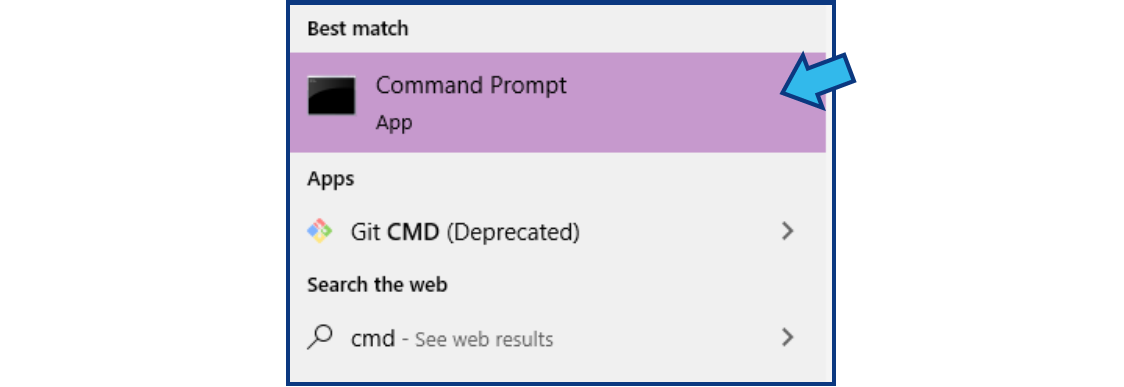
- Type cmd. The Command Prompt app should appear under Best match. If highlighted, press the Enter key, or use the mouse to select it from the list. (Note: There may be no visible place to type at first, but it will appear when you begin typing with the window menu open).
cmd
Step 3.
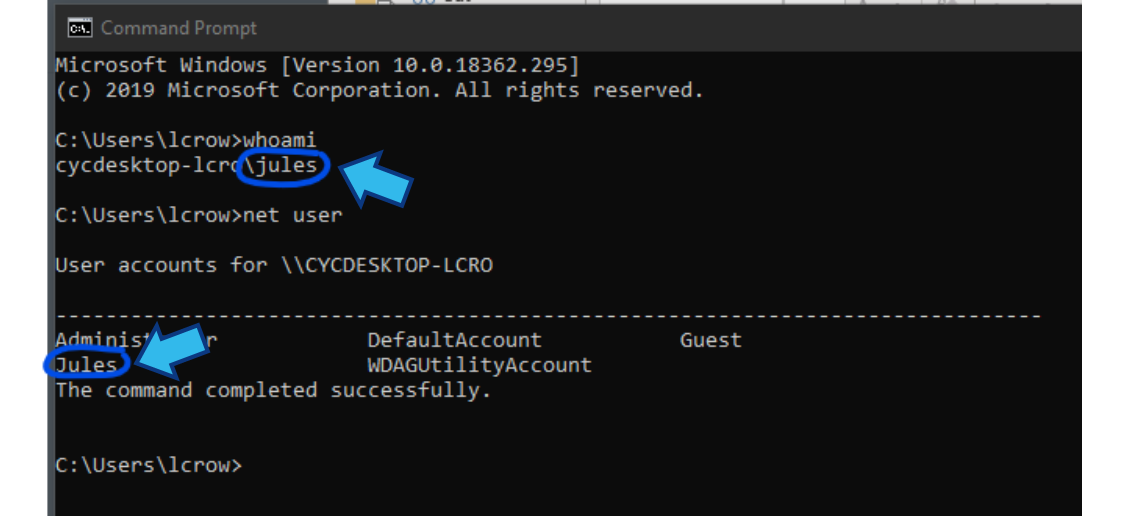
- At the prompt type whoami and press the Enter key to display the user's net user account name.
whoami

- If there are multiple users on the device you can also type net user to see a list of all available user accounts.
net user

- In the example pictured below, the net user account names when using these options are circled.
Comments
0 comments
Please sign in to leave a comment.