

Vol.7 - November / December 2019
In this issue:
Enhancements
Two recent enhancements are highlighted below.
Color Coding by Category
In version 1.4611, we added the ability to customize the background color of matters in Litigation, Claims, and Labor Relations modules based on the Category Code applied to a matter. In the example below, the Dangerous Condition category has been customized to the color orange.

This customization will be noticeable on the basic screen and in search lists, as shown below.

Added Trial Date to Litigation Report Options
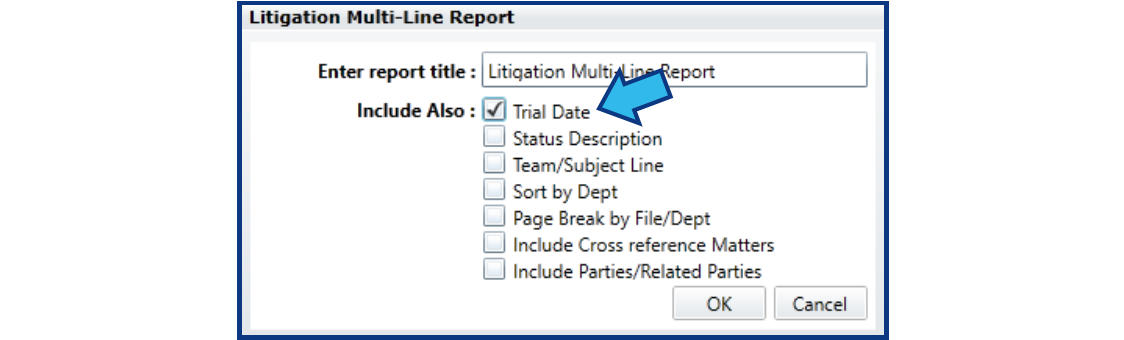
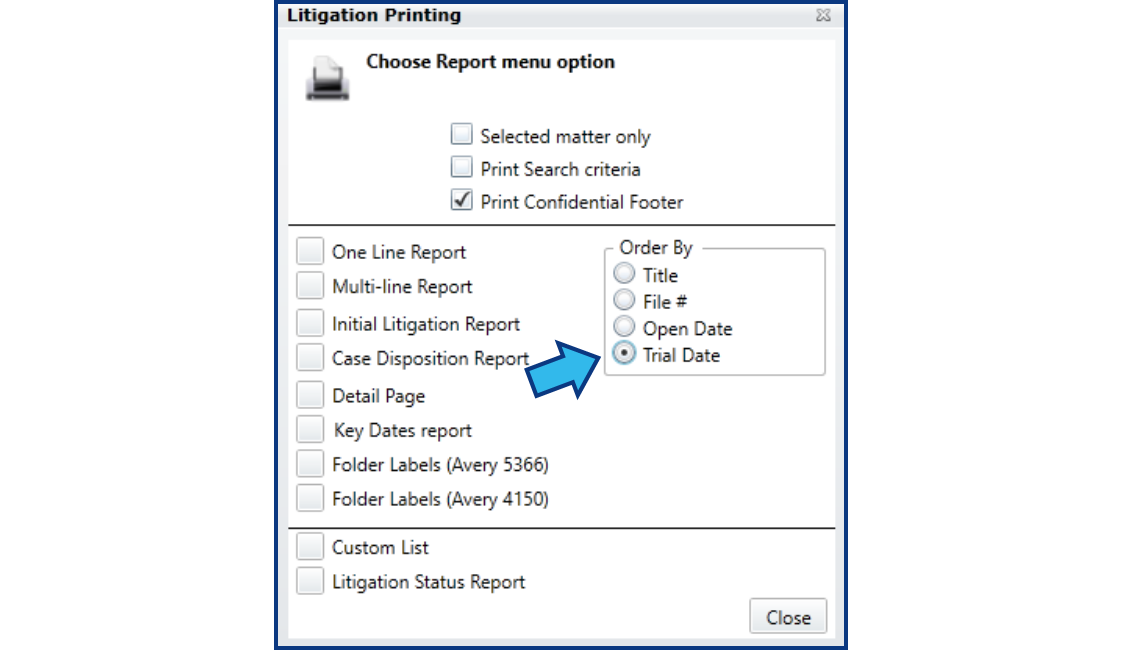
In the Litigation module, we added Trial Date to Multi-Line and Detail Page Reports and provided the ability to sort results by Trial Date order.
Enhancement Lists
You can view all the latest enhancements to CityLaw / CountyLaw in the following articles in our Help Center:
Tips from Support
In this issue we want to talk about the role of the CityLaw / CountyLaw System Admin. System Admin’s can play an important role in the continual function of CityLaw / CountyLaw.
System Admin Functions
A System Admin has access to the setup and security of CityLaw / CountyLaw. This allows them to do the following functions:
- Set up a new user.
- Make a user inactive when no longer needed.
- Add options to drop-downs such as category codes or dispositions, among many others.
- Restore deleted documents that have accidentally been deleted (a feature available in the Web version).
- Add new vendors or judges.
- Deny File Access to users.
- Grant File Access to users who had been denied.
- Act as a point of contact for upgrades and enhancements.
System Admin Passwords
The System Admin will have a special admin password that grants them access to the restricted portions of the System Management module where many of the system settings can be modified or edited. System Admins also have authorization for a special daily password that grants them access to other CityLaw / CountyLaw functions.
System Admin Training
Remote System Admin training is available and included in the standard support and maintenance contract. To schedule a remote training session, contact Cycom Support .
In addition to the functions listed above, a System Admin can be trained on additional functions of CityLaw / CountyLaw, if requested. We can assist you to find where things are located and how they are used by other sites, if desired.
New Help Center Articles
We are continually adding articles to the Help Center to help you find the information you need. A few of our latest additions a System Admin might find helpful include:
Support Q & A
Q – I called Support for assistance and no one answered. Why does that happen?
-
A – This can happen if all Support Specialists are busy assisting other customers and cannot take a phone call at that time.
Q – If no one answers the Support line, should I leave a voice message asking for a call back?
-
A – You can do that, but it would help us if you describe the reason for the call as much as you can. However, we would recommend you send us an email instead. Our Support Specialists may be able to send you an email response faster than calling you back. This is especially true if we know what the reason is for the call. We can point you to information that will help you resolve the issue without requiring us to connect to your PC.
Q – I left a voice message for Support and got an email asking for more information. Why didn’t I just get a call back?
-
A – We try to assist everyone as quickly as possible. Our Support Specialists are likely helping someone else but can send an email to request the information they will need to best help you and get the issue resolved quickly.
Q - How long does it take to get a response from Support?
-
A - You should get some type of response within two hours of our receipt of your call or email. The response may be a request for more information, or it may point you to some instructions that may answer the question you asked.
Support Topic Suggestions
We would love to hear from you with your suggestions for Support Topics to be put in our newsletter. If you have any suggestions, send them to support@cycominc.com.
Contacting Cycom Support
Cycom Support can be reached in the following ways:
- Phone call to 1-800-292-6688
- Email to support@cycominc.com
Whether calling or emailing please describe the issue as clearly and succinctly as you can. This will help us respond in an appropriate amount of time and with the tools needed.
When leaving a voice message, please include your name, phone number, your organization, and a brief description of the issue.
Observed Holidays
Cycom Support will be closed the following days.
- November 11, 2019: Veteran’s Day
- November 28 and 29, 2019: Thanksgiving Day
- December 25, 2019: Christmas Day
- January 1, 2020: New Year's Day
- January 20, 2020: Martin Luther King Jr. Day
- February 17, 2020: President's Day
Comments
0 comments
Please sign in to leave a comment.